
Estimating tax payable#
In this example we are given the following scenario:
Personal tax (before deductions) in Australia is based on the table below. The tax payable at the end of the financial year depends on the individual’s income. The higher the income, the higher the tax rate, as defined by tax brackets (or tiers). Given a list of incomes, calculate the corresponding tax payable for each income.
Income Thresholds |
Rate |
Tax payable |
|---|---|---|
$0 - $18,200 |
0% |
Nil |
$18,200 - $45,000 |
19% |
19c for each $1 over $18,200 |
$45,000 - $120,000 |
32.5% |
$5,092 plus 32.5c for each $1 over $45,000 |
$120,000 - $180,000 |
37% |
$29,467 plus 37c for each $1 over $120,000 |
$180,000 and over |
45% |
$51,667 plus 45c for each $1 over $180,000 |
We start by importing pandas, numpy and piso, and creating an interval index for the tax brackets.
In [1]: import pandas as pd

In [2]: import numpy as np

In [3]: import piso

In [4]: tax_brackets = pd.IntervalIndex.from_breaks(
   ...:     [0,18200,45000,120000,180000,np.inf],
   ...:     closed="left",
   ...: )
   ...:

In [5]: tax_brackets
Out[5]:
IntervalIndex([      [0.0, 18200.0),   [18200.0, 45000.0),
                [45000.0, 120000.0), [120000.0, 180000.0),
                    [180000.0, inf)],
              dtype='interval[float64, left]')
With each interval in the tax bracket, we’ll associate three values:
the lower threshold for the tax bracket
the fixed amount payable
the tax rate for each dollar above the threshold (as a fraction)
We describe this data as a pandas.DataFrame indexed by tax_brackets.
In [6]: tax_rates = pd.DataFrame(
   ...:     {
   ...:         "threshold":tax_brackets.left,
   ...:         "fixed":[0, 0, 5092, 29467, 51667],
   ...:         "rate":[0, 0.19, 0.325, 0.37, 0.45],
   ...:     },
   ...:     index = tax_brackets,
   ...: )
   ...:

In [7]: tax_rates
Out[7]:
                      threshold  fixed   rate
[0.0, 18200.0)              0.0      0  0.000
[18200.0, 45000.0)      18200.0      0  0.190
[45000.0, 120000.0)     45000.0   5092  0.325
[120000.0, 180000.0)   120000.0  29467  0.370
[180000.0, inf)        180000.0  51667  0.450
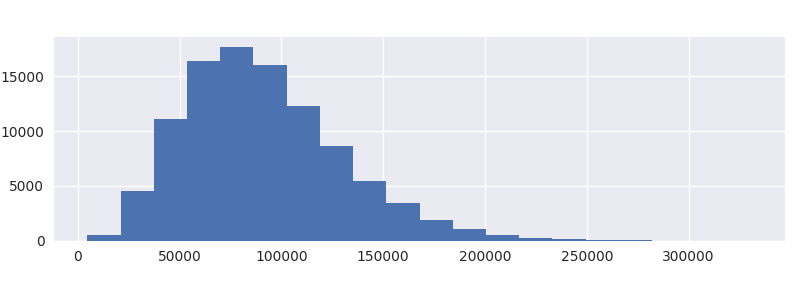
For the income, we’ll generate some random integers (and plot the distribution) corresponding to 100,000 individuals.
In [8]: income = pd.Series(np.random.beta(5,50, size=100000)*1e6).astype(int)

In [9]: income.plot.hist(bins=20);
We are now in a position to use piso.lookup(), which take two parameters:
a
pandas.DataFrameorpandas.Serieswhich is indexed by apandas.IntervalIndexthe values which are will be compared to the interval index
In [10]: tax_params = piso.lookup(tax_rates, income)

In [11]: tax_params
Out[11]:
        threshold  fixed   rate
37772     18200.0      0  0.190
131071   120000.0  29467  0.370
41095     18200.0      0  0.190
68494     45000.0   5092  0.325
41290     18200.0      0  0.190
...           ...    ...    ...
52049     45000.0   5092  0.325
129674   120000.0  29467  0.370
79032     45000.0   5092  0.325
110209    45000.0   5092  0.325
20305     18200.0      0  0.190

[100000 rows x 3 columns]
The result is a dataframe, indexed by the values of income, sharing the same columns as tax_rates.
We can then use a vectorised calculation for the tax payable:
In [12]: tax_params["fixed"] + (tax_params.index-tax_params["threshold"])*tax_params["rate"]
Out[12]:
37772      3718.680
131071    33563.270
41095      4350.050
68494     12727.550
41290      4387.100
            ...
52049      7382.925
129674    33046.380
79032     16152.400
110209    26284.925
20305       399.950
Length: 100000, dtype: float64
Alternative approaches#
There are a couple of alternative, straightforward solutions which do not require piso which we detail below.
Alternative 1: pandas.cut
The tax_params dataframe that was produced above by piso.lookup() can be reproduced using pandas.cut() which can be used to assign bins to data with an interval index.
In [13]: tax_params = tax_rates.loc[pd.cut(income, tax_brackets)].set_index(income)

In [14]: tax_params
Out[14]:
        threshold  fixed   rate
37772     18200.0      0  0.190
131071   120000.0  29467  0.370
41095     18200.0      0  0.190
68494     45000.0   5092  0.325
41290     18200.0      0  0.190
...           ...    ...    ...
52049     45000.0   5092  0.325
129674   120000.0  29467  0.370
79032     45000.0   5092  0.325
110209    45000.0   5092  0.325
20305     18200.0      0  0.190

[100000 rows x 3 columns]
This approach however runs approximately 20 times slower than piso.lookup().
Alternative 2: applying function
The second approach involves writing a function which takes a single value (an income for an individual) and returns the tax payable. The function can then used with pandas.Series.apply
In [15]: def calc_tax(value):
   ....:     if value <= 18200:
   ....:         tax = 0
   ....:     elif value <= 45000:
   ....:         tax = (value-18200)*0.19
   ....:     elif value <= 120000:
   ....:         tax = 5092 + (value-45000)*0.325
   ....:     elif value <= 180000:
   ....:         tax = 29467 + (value-120000)*0.37
   ....:     else:
   ....:         tax = 51667 + (value-180000)*0.45
   ....:     return tax
   ....:

In [16]: income.apply(calc_tax)
Out[16]:
0         3718.680
1        33563.270
2         4350.050
3        12727.550
4         4387.100
           ...
99995     7382.925
99996    33046.380
99997    16152.400
99998    26284.925
99999      399.950
Length: 100000, dtype: float64
This approach runs approximately 3 times slower than piso.lookup(). It also requires a function to be defined which is relatively cumbersome to implement. This approach becomes increasingly unattractive, and error prone, as the number of tax brackets increases.